Building an AI-Enhanced Task Management Pipeline on Render
Deploy a full-stack AI task manager using OpenAI embeddings, semantic search, pgvector, FastAPI, React, and PostgreSQL on Render's free tier in under an hour.
Building an AI-Enhanced Task Management Pipeline on Render
As developers, we often juggle countless tasks. Tracking them manually can quickly become overwhelming. What if you could leverage AI to not only organize but also intelligently summarize, prioritize, and search your tasks using natural language? In this guide, I’ll walk you through building exactly that. It’s a full stack application for AI powered task management, deployed on Render’s free tier.
Drawing from my experience scaling infrastructure on GCP and migrating complex systems, this project combines modern AI (OpenAI embeddings and summarization) with a resilient architecture using FastAPI, React, and PostgreSQL with pgvector. The result? A production-ready app that handles semantic search and AI processing without breaking the bank. Whether you’re prepping for a demo or just want to streamline your workflow, follow along to deploy this in under an hour.
Why This Architecture?
I’ve seen monoliths bog down under AI workloads and microservices overcomplicate simple pipelines. Here, we strike a balance: synchronous AI processing for the free tier (scalable to async with workers later), vector search for smart querying, and Render Blueprints for effortless IaC.
Pros:
- Zero-cost deployment
- Semantic insights into your tasks
Cons:
- Sync processing may timeout on heavy loads (ideal for PoC; upgrade for production)
Prerequisites
Before diving in, gather these essentials:
- A free Render account (sign up at render.com if you haven’t).
- OpenAI API key (get one from platform.openai.com. Start with the free tier credits).
- Git and GitHub for version control.
- Basic command-line comfort (we’ll use bash/zsh equivalents).
- Node.js (v18+) and Python 3.10+ installed locally for development.
No Docker needed for this PoC. We’ll containerize via Render. All code is ready to copy and paste, complete with warnings for common pitfalls.
Step 1: Project Setup and Local Environment
Start with a clean slate to avoid dependency hell, a lesson learned from countless GCP pipeline builds.
1
2
3
4
5
6
7
8
9
10
11
12
13
14
15
16
17
18
# Create and navigate to your project
mkdir ai-task-pipeline && cd ai-task-pipeline
git init

# Set up directories
mkdir backend frontend

# Backend: Python venv and deps
python -m venv venv
source venv/bin/activate  # On Windows: venv\Scripts\activate
pip install fastapi uvicorn sqlalchemy psycopg2-binary openai pgvector python-dotenv

# Frontend: Vite + React
cd frontend
npx create-vite . --template react-ts
npm install axios tailwindcss @tailwindcss/cli
npx tailwindcss init -p  # Generates tailwind.config.js and postcss.config.js
cd ..
Create .env in the root (add to .gitignore!):
1
OPENAI_API_KEY=sk-your-key-here
Tip: If Tailwind init fails (v4 quirks), manually add
@import "tailwindcss";tofrontend/src/index.css. Test locally to catch import issues early.
Step 2: Local Database with Docker (Optional for Testing)
For local dev, spin up PostgreSQL with pgvector using Docker. It closely mirrors Render’s managed setup, ensuring a smooth transition to production.
Create docker-compose.yml:
1
2
3
4
5
6
7
8
9
10
11
12
13
14
services:
  postgres:
    image: ankane/pgvector:latest
    environment:
      POSTGRES_DB: ai_task_db
      POSTGRES_USER: postgres
      POSTGRES_PASSWORD: password
    ports:
      - "5432:5432"
    volumes:
      - postgres_data:/var/lib/postgresql/data

volumes:
  postgres_data:
Launch it:
1
docker-compose up -d
Update .env:
1
DATABASE_URL=postgresql://postgres:password@localhost:5432/ai_task_db
Note: Stop with docker-compose down when done. For production, we’ll use Render’s managed Postgres. There is no local overhead.
Step 3: Building the AI-Powered Backend
The heart of our app is that FastAPI handles requests, OpenAI generates summaries, priorities, and embeddings, and pgvector enables cosine-similarity search. From microservices migrations, I know keeping this lean prevents bloat.
Create backend/main.py:
1
2
3
4
5
6
7
8
9
10
11
12
13
14
15
16
17
18
19
20
21
22
23
24
25
26
27
28
29
30
31
32
33
34
35
36
37
38
39
40
41
42
43
44
45
46
47
48
49
50
51
52
53
54
55
56
57
58
59
60
61
62
63
64
65
66
67
68
69
70
71
72
73
74
75
76
77
78
79
80
81
82
83
84
85
86
87
88
89
90
91
92
93
94
95
from fastapi import FastAPI, HTTPException
from fastapi.middleware.cors import CORSMiddleware
from sqlalchemy import create_engine, Column, Integer, String
from sqlalchemy.ext.declarative import declarative_base
from sqlalchemy.orm import sessionmaker
from openai import OpenAI
from pgvector.sqlalchemy import Vector
from pydantic import BaseModel
from dotenv import load_dotenv
import os

load_dotenv()

app = FastAPI(title="AI Task Manager API")

# CORS for frontend (restrict origins in prod)
app.add_middleware(
    CORSMiddleware,
    allow_origins=["http://localhost:5173", "https://your-frontend.onrender.com"],
    allow_credentials=True,
    allow_methods=["*"],
    allow_headers=["*"],
)

engine = create_engine(os.getenv("DATABASE_URL"))
SessionLocal = sessionmaker(autocommit=False, autoflush=False, bind=engine)
Base = declarative_base()
client = OpenAI(api_key=os.getenv("OPENAI_API_KEY"))

class Task(Base):
    __tablename__ = "tasks"
    id = Column(Integer, primary_key=True, index=True)
    description = Column(String, index=True)
    summary = Column(String)
    priority = Column(String)  # High/Medium/Low
    embedding = Column(Vector(1536))  # OpenAI ada-002 dimension

Base.metadata.create_all(bind=engine)

class TaskCreate(BaseModel):
    description: str

class TaskQuery(BaseModel):
    question: str

@app.post("/tasks", response_model=dict)
def create_task(task: TaskCreate):
    try:
        # AI summarization and prioritization
        response = client.chat.completions.create(
            model="gpt-4o-mini",
            messages=[{"role": "user", "content": f"Summarize and prioritize (High/Medium/Low): {task.description}"}]
        )
        content = response.choices[0].message.content
        # Simple parsing. Improve with regex in prod
        summary_start = content.find("Summary:") + 9
        priority_start = content.find("Priority:") + 10
        summary = content[summary_start:priority_start-10].strip()
        priority = content[priority_start:].strip()

        # Generate embedding
        embedding_resp = client.embeddings.create(model="text-embedding-ada-002", input=task.description)
        embedding = embedding_resp.data[0].embedding

        db = SessionLocal()
        db_task = Task(description=task.description, summary=summary, priority=priority, embedding=embedding)
        db.add(db_task)
        db.commit()
        db.refresh(db_task)
        db.close()

        return {"id": db_task.id, "summary": summary, "priority": priority}
    except Exception as e:
        raise HTTPException(status_code=500, detail=f"AI processing failed: {str(e)}")

@app.post("/query", response_model=list[dict])
def query_tasks(query: TaskQuery):
    try:
        embedding_resp = client.embeddings.create(model="text-embedding-ada-002", input=query.question)
        query_embedding = embedding_resp.data[0].embedding

        db = SessionLocal()
        results = db.query(Task).order_by(Task.embedding.cosine_distance(query_embedding)).limit(5).all()
        db.close()

        return [
            {"id": t.id, "description": t.description, "summary": t.summary, "priority": t.priority}
            for t in results
        ]
    except Exception as e:
        raise HTTPException(status_code=500, detail=f"Search failed: {str(e)}")

if __name__ == "__main__":
    import uvicorn
    uvicorn.run(app, host="0.0.0.0", port=8000)
Best Practice: Add Pydantic models for validation and CORS for browser compatibility.
Tip: OpenAI has rate limits. Handle them with retries in production (for example, exponential backoff).
Step 4: Crafting the Responsive Frontend
A clean UI is crucial. This project uses Tailwind CSS for rapid, mobile-first design.
Update frontend/src/App.tsx:
1
2
3
4
5
6
7
8
9
10
11
12
13
14
15
16
17
18
19
20
21
22
23
24
25
26
27
28
29
30
31
32
33
34
35
36
37
38
39
40
41
42
43
44
45
46
47
48
49
50
51
52
53
54
55
56
57
58
59
60
61
62
63
64
65
66
67
68
69
70
71
72
73
74
75
76
77
78
79
80
81
82
83
84
85
86
87
88
89
90
91
92
93
94
95
96
97
98
99
100
101
102
103
104
105
106
107
108
109
110
111
112
113
114
115
116
117
118
119
120
121
import React, { useState } from 'react';
import axios from 'axios';

const API_BASE_URL = import.meta.env.VITE_API_URL || 'http://localhost:8000';

const App: React.FC = () => {
  const [description, setDescription] = useState('');
  const [query, setQuery] = useState('');
  const [results, setResults] = useState<any[]>([]);
  const [loading, setLoading] = useState(false);

  const createTask = async () => {
    if (!description.trim()) return;
    setLoading(true);
    try {
      const res = await axios.post(`${API_BASE_URL}/tasks`, { description });
      alert(`Task created! Summary: ${res.data.summary}`);
      setDescription('');
    } catch (error) {
      console.error(error);
      alert('Task creation failed—check console.');
    } finally {
      setLoading(false);
    }
  };

  const searchTasks = async () => {
    if (!query.trim()) return;
    setLoading(true);
    try {
      const res = await axios.post(`${API_BASE_URL}/query`, { question: query });
      setResults(res.data);
    } catch (error) {
      console.error(error);
      alert('Search failed.');
    } finally {
      setLoading(false);
    }
  };

  const getPriorityBadge = (priority: string) => {
    const colors = {
      High: 'bg-red-100 text-red-800',
      Medium: 'bg-yellow-100 text-yellow-800',
      Low: 'bg-green-100 text-green-800'
    };
    return `px-2 py-1 text-xs rounded-full ${colors[priority] || 'bg-gray-100 text-gray-800'}`;
  };

  return (
    <div className="min-h-screen bg-gray-50">
      <div className="max-w-4xl mx-auto px-4 py-8">
        <h1 className="text-3xl font-bold text-center mb-8">AI Task Manager</h1>

        {/* Create Task */}
        <div className="bg-white p-6 rounded-lg shadow mb-8">
          <h2 className="text-xl font-semibold mb-4">Add a New Task</h2>
          <div className="flex flex-col md:flex-row gap-4">
            <input
              type="text"
              value={description}
              onChange={(e) => setDescription(e.target.value)}
              placeholder="Describe your task..."
              className="flex-1 p-3 border rounded-lg focus:ring-2 focus:ring-blue-500"
              onKeyDown={(e) => e.key === 'Enter' && createTask()}
            />
            <button
              onClick={createTask}
              disabled={loading || !description}
              className="px-6 py-3 bg-blue-600 text-white rounded-lg hover:bg-blue-700 disabled:opacity-50"
            >
              {loading ? 'Adding...' : 'Add Task'}
            </button>
          </div>
        </div>

        {/* Search Tasks */}
        <div className="bg-white p-6 rounded-lg shadow mb-8">
          <h2 className="text-xl font-semibold mb-4">Semantic Search</h2>
          <div className="flex flex-col md:flex-row gap-4">
            <input
              type="text"
              value={query}
              onChange={(e) => setQuery(e.target.value)}
              placeholder="e.g., 'high priority AI tasks'"
              className="flex-1 p-3 border rounded-lg focus:ring-2 focus:ring-green-500"
              onKeyDown={(e) => e.key === 'Enter' && searchTasks()}
            />
            <button
              onClick={searchTasks}
              disabled={loading || !query}
              className="px-6 py-3 bg-green-600 text-white rounded-lg hover:bg-green-700 disabled:opacity-50"
            >
              {loading ? 'Searching...' : 'Search'}
            </button>
          </div>
        </div>

        {/* Results */}
        {results.length > 0 && (
          <div className="bg-white p-6 rounded-lg shadow">
            <h2 className="text-xl font-semibold mb-4">Results ({results.length})</h2>
            <div className="space-y-4">
              {results.map((task) => (
                <div key={task.id} className="border p-4 rounded-lg">
                  <div className="flex justify-between items-start mb-2">
                    <h3 className="font-medium">{task.description}</h3>
                    <span className={getPriorityBadge(task.priority)}>{task.priority}</span>
                  </div>
                  <p className="text-gray-600">{task.summary}</p>
                </div>
              ))}
            </div>
          </div>
        )}
      </div>
    </div>
  );
};

export default App;
Configure Tailwind in tailwind.config.js (add content paths):
1
2
3
4
5
6
/** @type {import('tailwindcss').Config} */
export default {
  content: ["./index.html", "./src/**/*.{js,ts,jsx,tsx}"],
  theme: { extend: {} },
  plugins: [],
}
Run: cd frontend && npm run dev. The UI is responsive by default, so test it on mobile.
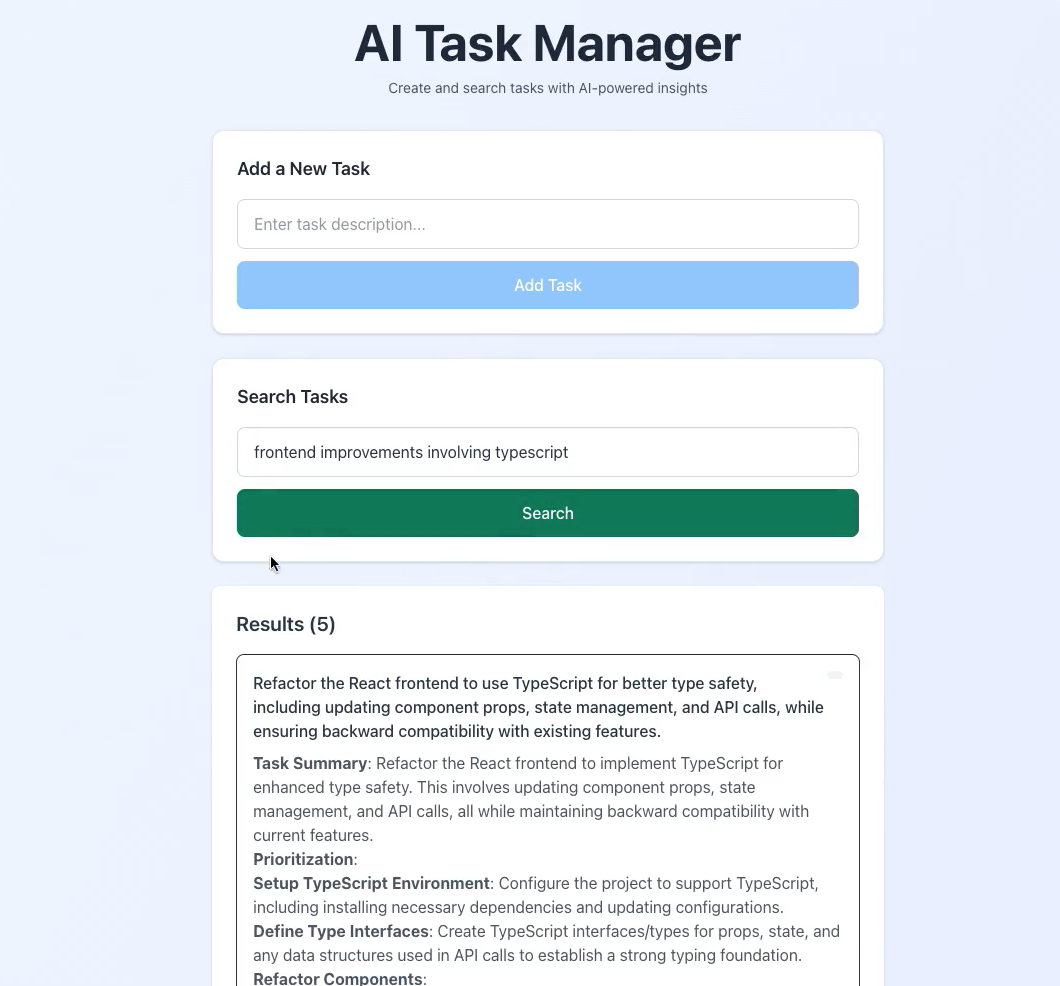 The AI Task Manager UI in action, showing task creation and semantic search results
Step 5: Render Blueprint for Deployment
IaC is key; this YAML deploys everything atomically.
Create render.yaml in root:
1
2
3
4
5
6
7
8
9
10
11
12
13
14
15
16
17
18
19
20
21
22
23
24
25
26
27
28
29
30
31
32
services:
  - type: web
    name: ai-task-api
    env: python
    buildCommand: pip install -r requirements.txt
    startCommand: uvicorn backend.main:app --host 0.0.0.0 --port $PORT
    envVars:
      - key: DATABASE_URL
        fromDatabase:
          name: ai_task_db
          property: connectionString
      - key: OPENAI_API_KEY
        sync: false  # Set in Render dashboard
    autoDeploy: true

  - type: static
    name: ai-task-frontend
    env: node
    rootDir: frontend
    buildCommand: npm install && npm run build
    publishPath: ./dist
    envVars:
      - key: VITE_API_URL
        value: https://ai-task-api.onrender.com  # Your API URL
    autoDeploy: true

databases:
  - name: ai_task_db
    databaseName: ai_task_db
    user: ai_user
    plan: free
    postgresMajorVersion: 15
Generate backend/requirements.txt:
1
2
3
4
5
6
7
8
fastapi==0.104.1
uvicorn[standard]==0.24.0
sqlalchemy==2.0.23
psycopg2-binary==2.9.9
pgvector==0.2.4
openai==1.3.7
python-dotenv==1.0.0
pydantic==2.5.0
Migration Note: Free tier uses sync processing. Add Celery/Redis later for async.
Step 6: Deploy and Configure
Push to GitHub, then navigate to Render Dashboard → Blueprints → New Blueprint Instance → Connect repo.
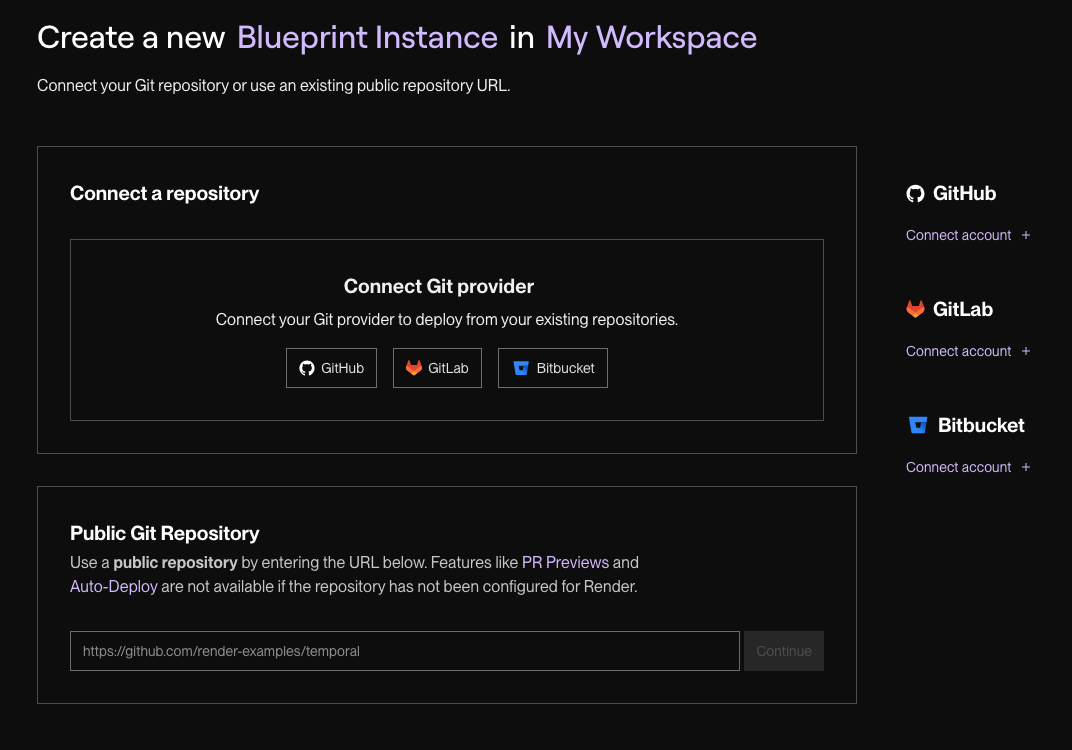 Figure 2: Connecting your GitHub repo to a new Render Blueprint instance.
- Set the proper values for
OPENAI_API_KEYand deploy changes. - For pgvector: Connect via psql (credentials in dashboard):
- Enable the pgvector Extension:
1
CREATE EXTENSION IF NOT EXISTS vector;
- Verify the Extension is Enabled:
1
\dx
- Manual redeploy API after extension enablement.
- Update frontend env var
VITE_API_URLto your API URL, commit/push for auto-redeploy.
Your app is now live at the static site URL. Test it end-to-end to ensure everything works.
Troubleshooting
From real-world deploys, here’s what trips folks up:
- 500 Errors on Task Create: pgvector not enabled or OpenAI key invalid. Check Render logs (
din dashboard) and quota. - CORS Blocks: Update
allow_originsin main.py to match your frontend URL. - Build Fails: Ensure
publishPath: distfor Vite; verify Node/Python versions in Render. - Embedding Dimension Mismatch: Stick to ada-002’s 1536. Custom models need Vector(dim) adjustment.
- Free Tier Timeouts: AI calls can lag; monitor with Render metrics, upgrade for speed.
If stuck, Render support is quick and responsive.
Next Steps and Enhancements
You’ve got a working AI task manager! To level up:
- Async Processing: Add Celery worker + Redis for non-blocking AI (official Render Key Value service for Redis: https://render.com/docs/key-value).
- Auth/Security: JWT via FastAPI, VPC peering for private DB access.
- Analytics: Dashboard for task trends using OpenAI insights.
- Scaling: Enable autoscaling on paid plans (official Render autoscaling YAML from docs: https://render.com/docs/autoscaling); monitor with Render’s built-ins.
This setup mirrors production patterns I’ve implemented. It is resilient, cost-effective, and extensible. Fork the repo, deploy your version, and let me know how it goes!